
In detail
Facilities work is mostly calendar-driven: the same inspections, the same servicing intervals, the same statutory checks, across buildings that each have their own quirks. The failure mode is never dramatic. It's a check that quietly stopped happening eight months ago, discovered when something goes wrong or when somebody asks for the records.
Planned work on a schedule
Set the interval once: monthly, quarterly, annually. And every occurrence appears against the right building on the right date. Leave the end date empty and it runs indefinitely, which is usually what a statutory check needs.
Set up the annual and quarterly items first, precisely because they're the easiest to lose. A daily check that stops happening is noticed within a week. An annual one that stops happening is noticed in year three, by an auditor.
Inspections with evidence
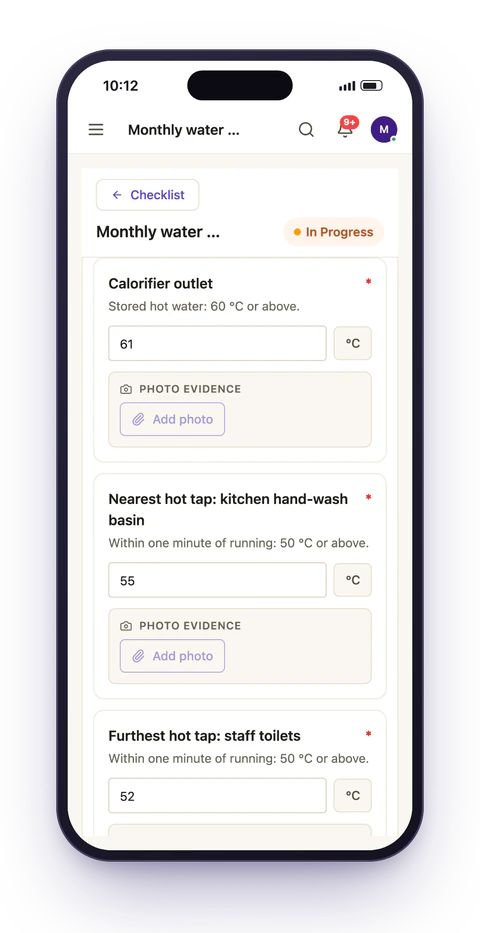
Checklists carry the specific items to verify, and can require a reading or a photo before an item is closed. Answering fail on an item reveals follow-ups asking for the fault detail and the corrective action, so the report and the remedial job come out of the same completion. Neither gets raised separately and hoped about.
That single behaviour removes the most common gap in facilities record-keeping: an inspection that found a fault, and no traceable link to whether the fault was ever fixed.
Assigned to the team, tagged to the building
Assign work to a team, not a named engineer, and holiday cover, contractor changes and territory reshuffles stop breaking the schedule.
Each task separately carries the location it belongs to, and an asset where the job concerns a specific piece of plant. That combination is what makes "everything outstanding at Building C" and "every service this boiler has had" answerable without a naming convention people have to remember. For a team covering twenty buildings with four engineers, this is the difference between a rota change costing an afternoon of task reassignment and costing nothing at all.
Reactive work alongside planned
Not everything is scheduled. A fault reported mid-shift needs to land in the same place as the planned work, or the team ends up watching two systems and trusting neither.
Reactive jobs can be raised directly, or generated automatically from a failed inspection item, and then sit on the same boards and in the same reporting as planned work. The useful consequence is that the ratio becomes visible: a building generating far more reactive than planned work is usually telling you its planned intervals are wrong.
Sign-off that survives an audit
Route completed inspections through a supervisor, then compliance where the work requires it. Rejections reopen the job with the reason attached instead of disappearing into email, and every transition is recorded with an identity and a timestamp. See approvals.
What managers get
Completion rates per building, what is overdue and where, and full history per site: the evidence pack for an insurer, a landlord or a regulator without a week of collating.
Was the quarterly test done at every building?
Completion by location
What did the engineer actually find?
Checklist items, readings and photos
Was the fault fixed?
The follow-up task raised from it
Who signed it off?
Approval trail with timestamps
Related: compliance evidence covers the records side in more detail, and property management covers portfolios where each unit has a tenant attached.
Getting the intervals right
The intervals you inherit are rarely the intervals the buildings need. They come from a manufacturer's manual, a previous contract, or whatever the last person set up.
Once a year of history exists, the schedule itself becomes reviewable. Two patterns should prompt a change:
- A planned check that never finds anything at one building, year after year, is a candidate for a longer interval, or it's not being done properly, and the completion times will tell you which.
- A building generating far more reactive than planned work is telling you the planned intervals are too long, or that the planned checks aren't looking at the thing that keeps failing.
This is the argument for keeping reactive and planned work in the same system. Split across two tools, the ratio is invisible, and the intervals never get revisited because nobody has the evidence to justify changing them.