
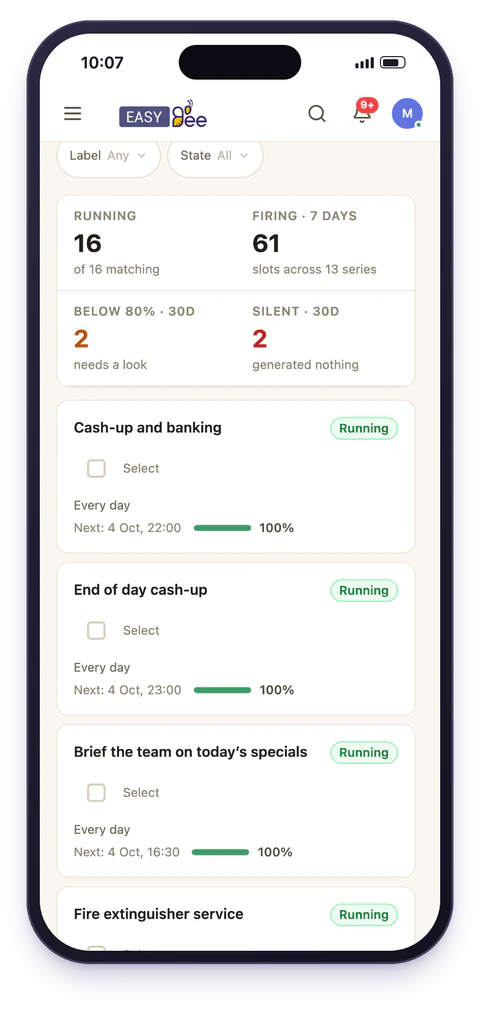
In detail
Most task tools were built for project work: a job appears, someone does it, it disappears. Operations are the opposite. Tuesday's fridge temperature check is the same check as Monday's, and the fact that Monday's was done tells you nothing about Tuesday. What matters is whether the pattern held.
EasyBee treats the pattern as the thing you create. You define a rule once, and every occurrence it generates is a separate record with its own assignee, completion state, evidence and history.
- 4
- Repeat patterns, each taking any interval you like
- 3
- Ways a series can end: on a date, after N runs, or never
- 4
- Views over the same underlying work
Rules, not copies
A schedule is a rule with a start date. Everything else is optional.
Daily
Weekly, on chosen days
Monthly
Yearly
Each pattern takes an interval, so every 2 weeks or every 3 months is one setting, not four separate schedules. A series can end on a date, after a set number of runs, or never. Never is what you almost always want for a routine that is simply part of how the site operates: there's no annual re-creation exercise, and no spreadsheet that stops being updated some time in March.
Occurrences are generated from the rule; nothing is copied from a template task. Changing the rule changes what happens next without rewriting what already happened, last month's completed checks keep the wording they were completed under, which matters if anyone ever has to explain them.
Assign to a team, not a person
This is the difference between a schedule that survives a rota and one that quietly dies.
Work can go to an individual, but it can also be assigned to a team. Give the morning open to Front of house and it's in the list of everyone in that team, so whoever is in can pick it up. It no longer sits in one person's list on the week they're off. Staff change and cover shifts; the schedule keeps working, because it was never attached to a single name in the first place.
Where the rota lives in EasyBee too, a schedule can go one step further and be assigned to whoever is on shift in a position at a site. Give the close to Head chef on shift at Riverside Quay and the rota decides who it reaches each night, swaps and cover included.
The failure is silent
Every task also carries a location and, where relevant, an asset, so a schedule is anchored to the site and the equipment it concerns. That's what makes per-site views, filters and reporting work without anyone tagging things by hand. Watchers can be added separately, people who want to see the outcome without being responsible for doing it.
Four views over the same schedule
Different jobs need different shapes, so the same underlying work is available four ways. Filters narrow any of them, by site, assignee, status or date window.
List
Board
Calendar
Table
Conditions combine with and / or and can be inverted with isn't, so "overdue at any site except Riverside" is a filter, not a manual scan.
What managers actually watch
The point of scheduling work is not to have created it. Reporting rolls occurrences up to answer the questions that get asked in practice:
- Which sites completed their routine this week, and which didn't
- What is overdue right now, and by how long
- Which checks fail most often, so the routine itself can be fixed
- Who signed off what, and when
Changing a schedule safely
Editing a schedule affects future occurrences and leaves completed history intact. That distinction matters for audits: changing today's process should never rewrite what happened last month. If a routine needs to stop, ending the schedule stops future occurrences without deleting the evidence that the previous two years of them were done.
Patterns that come up again and again
Most operational routines fall into a small number of shapes. These are the ones teams set up first, and who they usually belong to.
Daily open
Team on shift
Daily close
Team on shift
Weekly, chosen days
Team
Every two weeks
Team
Monthly
Named specialist
Yearly
Compliance team
The failure mode is nearly always the same: the daily routines get set up, the quarterly ones get promised, and it's the quarterly ones that an inspector asks about. A schedule with no end date is the cheapest insurance against a twelve-month gap nobody noticed.
Where schedules meet the rest
A schedule usually carries a checklist, so an occurrence isn't merely "done" but a record of each step with photos and readings attached.
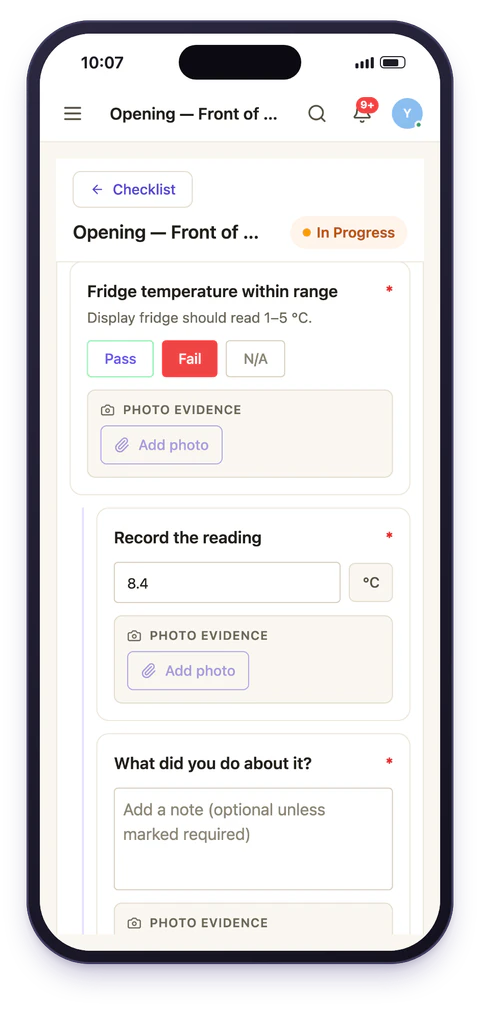
Where work needs sign-off, it feeds an approval chain instead of closing on the word of whoever performed it.
If the goal is getting every branch running the same routine, that pattern is described under multi-site consistency and opening and closing routines.