 Built for hospitality teams
Your staff rota and daily checks, in one app
Plan shifts, run opening and closing checklists, log fridge temperatures and sign off the week, across every site. For restaurants, cafés, bars and multi-site teams, on the web and on every phone.
- No demo call needed
- No card required
- Web, iOS and Android
Sound familiar?
Built for work that repeats
Most task tools assume every job is new. Operations don't work that way — the same checks happen every shift, and someone has to show they happened.
The same task, re-created 52 times
Weekly deep cleans and quarterly audits get typed out again every cycle, or they get forgotten. Neither is a system.
“All good” is not evidence
A ticked box with no reading, no photo and no name against it proves nothing to an auditor, and hides the one fridge that was warm.
The rota lives somewhere else
Who is working sits in a spreadsheet and the work in another app, so a task pinned to someone who swapped their shift still looks assigned.
Why one app
The rota and the food-safety checks, on the same people
Rota apps stop at who is working. Checklist apps don't know who is in. EasyBee does both, so tonight's close and its fridge checks go to whoever is actually closing, and a swapped shift takes them along.
| What it does | Rota-only app | Checklist-only app | EasyBee |
|---|---|---|---|
| Plan the rota and see what it costs | Yes | No | Yes |
| Clocking in, timesheets and holiday | Yes | No | Yes |
| Opening, closing and food-safety checklists | No | Yes | Yes |
| A reading, a photo and a fix raised when a check fails | No | Yes | Yes |
| Tonight's close goes to whoever the rota has closing | No | No | Yes |
| One set of people, sites and logins for both | No | No | Yes |
Why EasyBee
Why run the day on EasyBee
Up in an afternoon
Import your people and sites from a spreadsheet, or book a free setup call and training and we'll do it with you.
Start free
No card, and no demo call needed. Your whole team, for as long as it takes to know it fits.
One app, not six
The rota, routines, checklists, sign-off, reports and chat, sharing the same people and sites.
On every phone
Staff see their shifts and what's due on iOS, Android or the web.
Built for UK rules
Working-time presets that cite their regulations, and guides to HACCP, SFBB and CP12.
See it working
A day at Riverside Quay
Real screens from the app, in a demo restaurant group we set up to show it. Pick a step, then press the numbers on the screen.
The rota, checked as you build it
Plan each site's week against what it needs. Gaps, broken working-time rules and the labour cost show up while you're still moving shifts around, and the clocked hours, leave and payroll follow from the same rota.
- Coverage gaps found before you publish, with who could fill them
- Working-time limits started from UK, EU and other country presets
- Clocking in on a phone or a kiosk, with timesheets and leave balances
Set the rhythm once
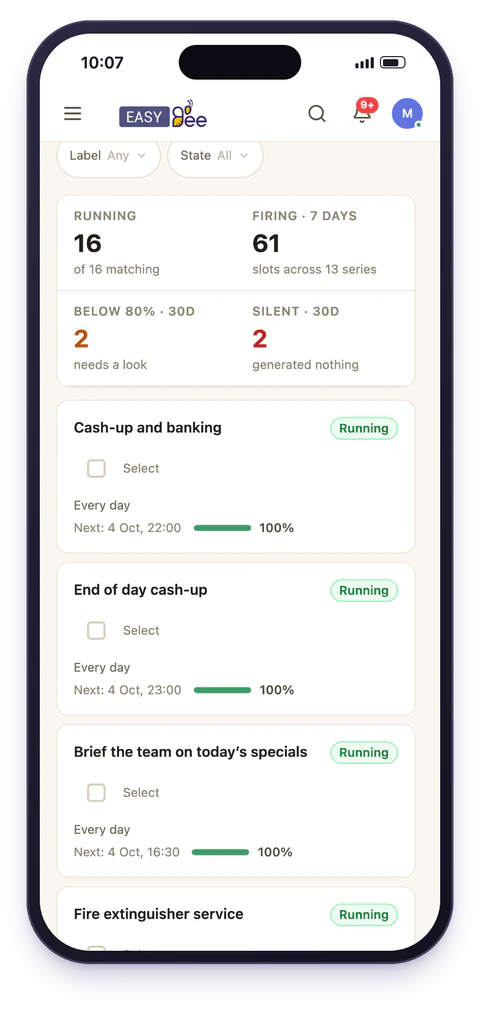
Daily opens, weekly deep cleans, quarterly audits. Every occurrence appears on the day it's due, generated from the rule, so nobody re-creates the same task fifty-two times a year.
- Daily, weekly, monthly or yearly, at any interval
- Ends on a date, after a number of runs, or never
- Assigned to a team, or to whoever is on shift that day
A record of every step, as it happens
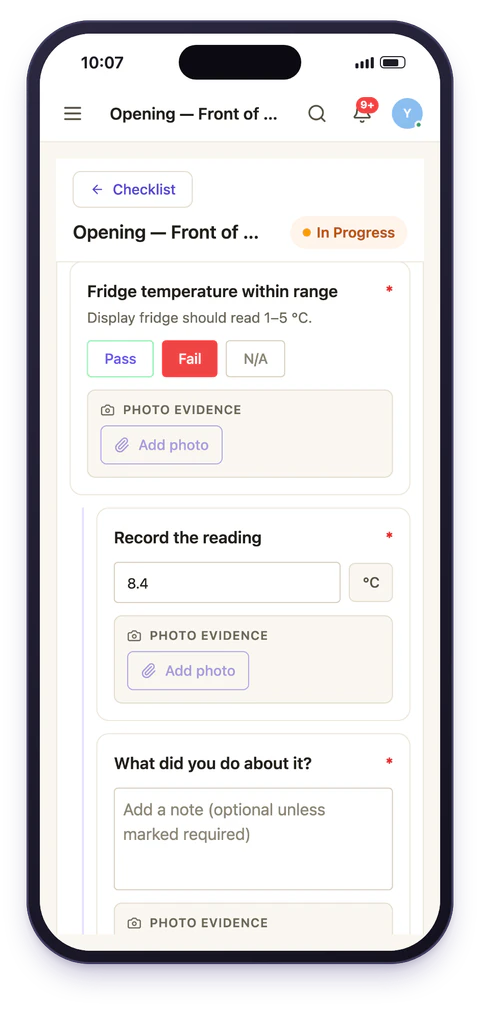
Staff work through each step on their phone. A failed check opens its own follow-up, so the warm fridge arrives with its reading and what was done about it.
- Nineteen item types, from pass/fail and temperature to barcode
- Follow-up questions that appear only when an answer needs them
- Each step stamped with who answered and when
Sign-off with a paper trail
Route completed work through as many named stages as your process needs. Every decision is recorded against the person who made it.
- Multi-stage chains with named reviewers
- Sending one back reopens it with the reason attached
- A pending-approvals inbox for each reviewer
Conversation where the work already is
Channels, direct messages and announcements in the same app as the rota and the tasks. @manager-on-duty reaches whoever is running the floor right now.
- A channel for each site, team or topic
- Announcements people confirm they have read
- Mention a person, a team, or whoever is on shift
See what slipped, at every site
What was done on time, late or missed, what failed and what is still waiting on sign-off, by site. A failed check raises its own corrective task, and someone you choose is told if it is still open when time runs out.
- On time, late and missed, against each task's due date
- Audit scores, flags and every submission, by site
- Emailed on a schedule, narrowed to each reader's sites
Free setup help
We'll set it up with you
Do it yourself in an afternoon, or book a call and we'll do it together, using your own rota and checklists. A person replies within one working day.
A setup call
We set up your first site with you on a call, using your own routines rather than a demo account with invented data in it.
Your data brought in
Send us the spreadsheets you run on now, with your people, sites and recurring checks, and we import them for you.
Training for your team
An online session for managers on the rota and checklists, and a short one for staff on the phone app.
- parts in one app: the rota, routines, checklists, sign-off, reports and chat
- 6
- working-time presets, each limit citing the regulation it comes from
- 7
- checklist item types, from pass/fail and temperature to signature and barcode
- 19
- to start, with your whole team, plus a free setup call and training
- £0
Works with Claude
Ask about your operation in plain English
Connect EasyBee to Claude, Anthropic's AI assistant, and ask what you would otherwise click through five screens to find. Claude works through the same permissions the person has in EasyBee, so it only sees what they can see.
- What's overdue across every site, and who it is with
- Who is on shift, where this week's gaps are, and a fair way to fill them
- Create or complete a task, or post to a channel
To connect it
- You need a Claude account on a plan that lets you add custom connectors, and your EasyBee sign-in.
- Add EasyBee as a custom connector in Claude's settings, using the address we send you.
- Sign in to EasyBee when Claude asks, and approve access. There is nothing to install.
Ask us for the address, and if you get stuck we'll connect it with you on a call.
Who it's for
Made for hospitality, ready for any team that runs on routines
Restaurants, cafés, bars and hotels first. The same rota, checklists and sign-off work wherever the day repeats.
By industry
FAQ
Questions we get asked
- What does EasyBee actually do?
- EasyBee runs the day-to-day side of team operations: the rota, with coverage, working-time rules and labour cost checked as it is built, and the time clock, leave balances and payroll export that follow from it; scheduled and one-off tasks; checklists that people complete on shift; approval chains for work that needs sign-off; and team chat alongside it. Because the rota and the work share one system, a task can go to whoever is on shift rather than to a name.
- Who is EasyBee for?
- Hospitality teams first: restaurants, cafés, bars and hotels, from one site to many, who need a rota and daily checks with a record of who did them and when. The same tools suit any team whose day runs on shifts and routines, such as retail, clinics, facilities and property management.
- How is it different from a general task manager?
- General task managers assume work is one-off and assigned to a person. EasyBee assumes work repeats: a schedule generates a fresh record each time it is due, it can be assigned to a whole team or to whoever is on shift in a position, and every task carries the location it belongs to. Checklists, approvals and audit history are built in rather than bolted on.
- Can I assign work to a team instead of one person?
- Yes. A task can go to individual people, to a team, where everyone in it sees the task, or to whoever the rota has on shift in a position at a site, so it reaches the person actually working rather than someone who is off. Every task also carries the location it belongs to, and an asset where relevant, so multi-site routines stay separable and per-site reporting works without tagging anything by hand.
- Does EasyBee work on mobile?
- Yes. EasyBee runs in any browser and as native iOS and Android apps, with push notifications for assignments, mentions and approvals. Staff on the floor typically use mobile while managers use the web app.
- How much does EasyBee cost?
- £5 per user a month, or £50 per user a year, for everything: the rota and shifts, tasks and routines, checklists, approvals and team chat, on web, iOS and Android. There are no tiers or add-ons. Large organisations can talk to us about volume pricing.
- Can I try it before paying?
- Yes. You can start free and invite your whole team without a card, and use all of EasyBee while you find out whether it fits how you work. No demo call is needed, though a free demo, or a setup call on your own routines, is there if you want one.
- Do you help us get set up?
- Yes, at no extra cost. EasyBee will set up your first site with you on a call, using your own routines rather than a demo account, and will import your people, sites and recurring checks from the spreadsheets you use now. You can also set it all up yourself, with no call needed.
- Do you train our team?
- Yes, online and at no extra cost: a session for managers on building the rota and checklists, and a short one for staff on using the EasyBee phone app on shift. Ask for it when you start or at any point after.
Put the repeating work on autopilot
Set up your first site, rota and checklist yourself today, or book a free demo and we'll show you round first. Setup help and training are free either way.