
In detail
A checklist is only useful if what was skipped is as visible as what was done. Paper fails at exactly this: a column of ticks filled in at the end of the shift in one sitting looks identical to a column filled in honestly, and nobody can tell the difference a month later.
EasyBee checklists are structured records. They aren't a note field somebody types "all good" into. Each item carries who completed it, when, and whatever evidence that step called for.
Steps that adapt to the answer
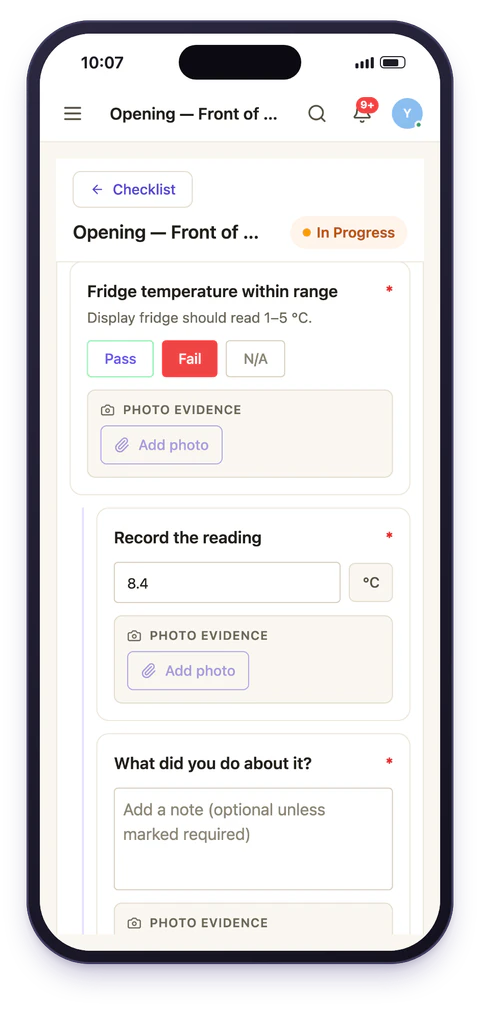
Items can branch. Answer No to Fridge temperature within range and a follow-up appears asking for the reading and a photo. Answer Yes and the list moves on.
This keeps two things true at once. The routine stays short for the ninety-five per cent of shifts where everything is fine, so people actually complete it, while the five per cent where something is wrong capture far more detail than a generic form would ever ask for, at the moment somebody is standing in front of the problem.
Follow-ups can nest. A failed check can ask for a reading, then, depending on how bad the reading is, ask what corrective action was taken and who was told.
Nineteen item types, because not every check is a tick
A step that asks whether the fridge is cold needs a number. A step that hands over responsibility needs a signature. A step that should show where somebody was standing needs a location stamp. Forcing all of that through a checkbox is how checklists stop meaning anything.
- Procedure
- Multi Check
- Radio Check
- Multiple Choice
- Text
- Pass/Fail
- Yes/No
- Photo
- Number
- Cost
- Temperature
- Calculation
- Table
- Signature
- Date Time
- Geo Stamp
- Location (address)
- Dropdown
- Barcode
Pass/Fail and Yes/No arrive with their options already set, N/A included, so the common case is one tap to add. Radio, multiple-choice and dropdown items take whatever options you write. Temperature and cost carry their units. Photo, signature and geo-stamp capture on the device, in the corridor, at the moment the step happens. A table takes a row at a time, one per delivery line or per probe, say. A calculation works a figure out from the numbers already given, like the average of two fridge readings. A barcode field takes a handheld scanner, or the code typed in.
Evidence captured at the point of work
Photos
Readings and free text
Timestamps and identity
That last distinction matters more than it sounds. A checklist stamped once at submission tells you when the paperwork was filed. A checklist stamped per step shows how the walk went: over twenty minutes in the order the route implies, or all at once at the end. Neither a photo nor a time stamp can say the work was done well, but both say who recorded what, and when, which is what a manager or an inspector reads first.
Sections and templates
Group items into sections — Front of house, Kitchen, Cellar, so a long routine reads as a walk through the building, and not as an undifferentiated list of forty items.
Save the result as a template. Rolling the same standard out to a new site is then one action, not a re-typing exercise, and changing the standard everywhere is a single edit with no per-site migration behind it. This is the mechanism behind multi-site consistency: sites aren't each maintaining their own dialect of the routine.
Automations
Checklists can act on what they find, not merely record it. Depending on an answer, a checklist can raise a follow-up task, notify a particular role, or send the completed log into an approval chain.
The practical effect is that a failed check stops being something a manager has to happen to notice. Here is one from the Riverside demo, end to end:
The check fails
Daniel's opening check at Riverside Quay finds the front-of-house fridge at 7.9 °C and answers Fail.The fix is raised
Submitting the run creates a corrective task, Fix: Fridge temperature within range, on the Front of House board for the Managers team, due in two hours, with the question and answer that raised it.Someone is told if it sits
If the task is still open an hour later, Maya, who runs the group, gets Warm fridge still not fixed. If it was closed first, nothing is sent.It closes on the record
Whoever fixes the fridge closes the task, which keeps a link back to the run that raised it.
What happens is set per question, so the fridge can raise a task and chase it while a missing menu card only notifies the shift lead. An answer can also be flagged, and flags are counted by site and category in reports, with how many are still open.
What managers see
Completion percentage per checklist, which items failed, and the evidence attached, without opening every task individually. The reports add audit scores per checklist, flags by site, and every submission in one grid you can export.
Because the records are structured and not free text, "every failed temperature check across all sites last month, with photos" is a query rather than an archaeology project. That's the difference between having records and being able to use them, and it's what compliance evidence is built on.
Built for a phone in a corridor
Checklists are completed by people walking around a building, not sitting at a desk. Staff typically work on mobile while managers review on the web app, with both looking at the same records, with neither reconciling the other.
Designing a checklist people actually finish
The most common reason a digital checklist fails is not the software. It's that somebody moved a forty-item paper form into an app unchanged, and it now takes longer than it used to.
A few things consistently help:
- Order it as a walk, not a list. Items grouped by where you physically are cut the time in half and stop people skipping back and forth.
- Ask closed questions. Fridge temperature within range? beats Check fridges, the second cannot fail, so it never records anything useful.
- Put the detail behind a follow-up. Ask for a reading only when the answer was No, instead of on every item every day.
- Only require a photo where it settles an argument. Evidence on everything trains people to photograph the floor to get past the screen.
- Cut anything nobody has ever acted on. If a failed item has never once produced a decision, it's not a check, it's a habit.
Six minutes, not twenty-five
Where checklists fit
A checklist usually rides on a recurring schedule, so it appears when it's due without anyone creating it. Where the result needs signing off it flows into approvals, and where something needs discussing, team chat sits alongside the work, not in a separate app.