
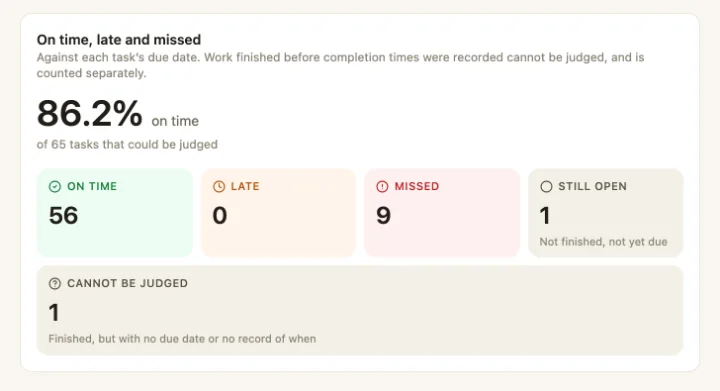
Records are only worth keeping if somebody reads them. Most teams fill in the checks and never look back, because looking back means opening forty runs one at a time or rebuilding a spreadsheet every Monday. So the warm fridge at one site and the close that keeps getting skipped at another stay invisible until an inspector or a complaint finds them.
Reports read the same records your staff fill in on their phones, and answer the questions a manager actually asks.
One question per report
On time, late and missed
Completion by site
Daily compliance
Scheduled work
Audit scores
Flags
Site vs company
Work per person
Submissions
Photos
When a check fails
A failed answer shouldn't wait for someone to read a report. A checklist question can act on the answer as soon as the run is submitted. This one is from the Riverside demo:
The check fails
Daniel's opening check at Riverside Quay finds the front-of-house fridge at 7.9 °C and answers Fail.The fix is raised
Submitting the run creates a corrective task, Fix: Fridge temperature within range, on the Front of House board for the Managers team, due in two hours, with the question and answer that raised it.Someone is told if it sits
If the task is still open an hour later, Maya, who runs the group, gets Warm fridge still not fixed. If it was closed first, nothing is sent.It closes on the record
Whoever fixes the fridge closes the task, and the task keeps a link back to the run that raised it. Corrective work has a due time, so if it runs late it counts as late like any other task.
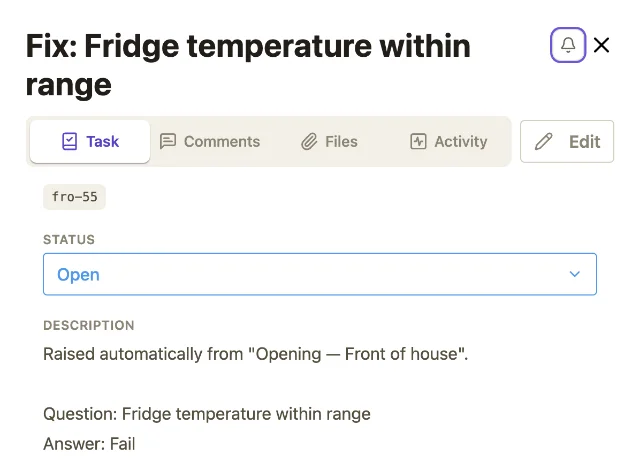
Who is told, and after how long, is set per question, and the people are worked out when the escalation fires, not when the run was submitted. If it names a role or a team, it reaches whoever holds that role or is in that team an hour later. How to set this up is covered under checklists.
What is waiting on sign-off
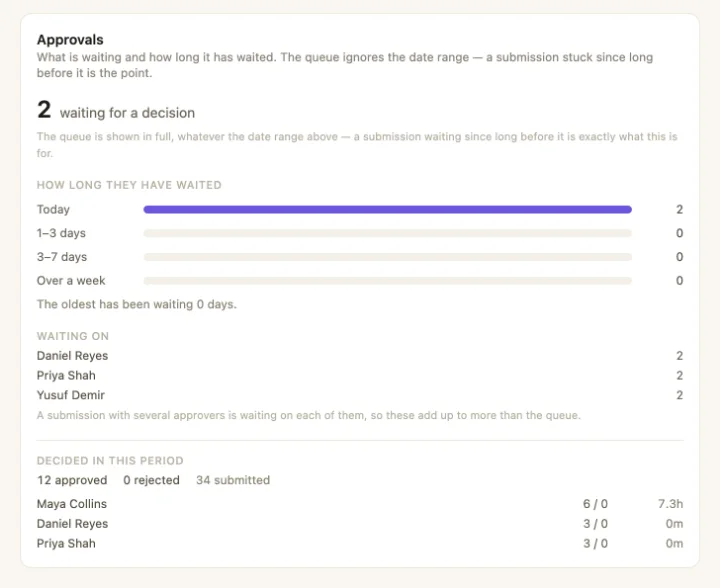
The Approvals report ignores the date range on purpose. A submission that has been stuck since before the period started is exactly the one you need to see. It shows how long each has waited and who it's waiting on, next to the decisions already made. The approval chain itself decides who may sign off what.
Reports that arrive
A report someone has to remember to open gets opened in the week something has already gone wrong. Eight of the reports, from completion to flags, can be scheduled instead:
- Daily, weekly or monthly, at a set time in the timezone you choose, so it stays at 7am through the clock change.
- To people, teams, roles or a whole site, with a preview of exactly who would get a copy before you save it.
- One copy per reader's sites, or the same figures for everyone. With the first, one schedule serves every area manager, each seeing only their own sites.
- Figures in the email, with an optional link to the rows behind them that expires.
What the numbers can and can't tell you
Where reports fit
Reports sit at the end of the loop. The rota says who was working, schedules create the work, checklists record how it was done and approvals sign it off. Reports show where any of that slipped, by site, without anyone collating it. For audits and inspections, see compliance evidence.