
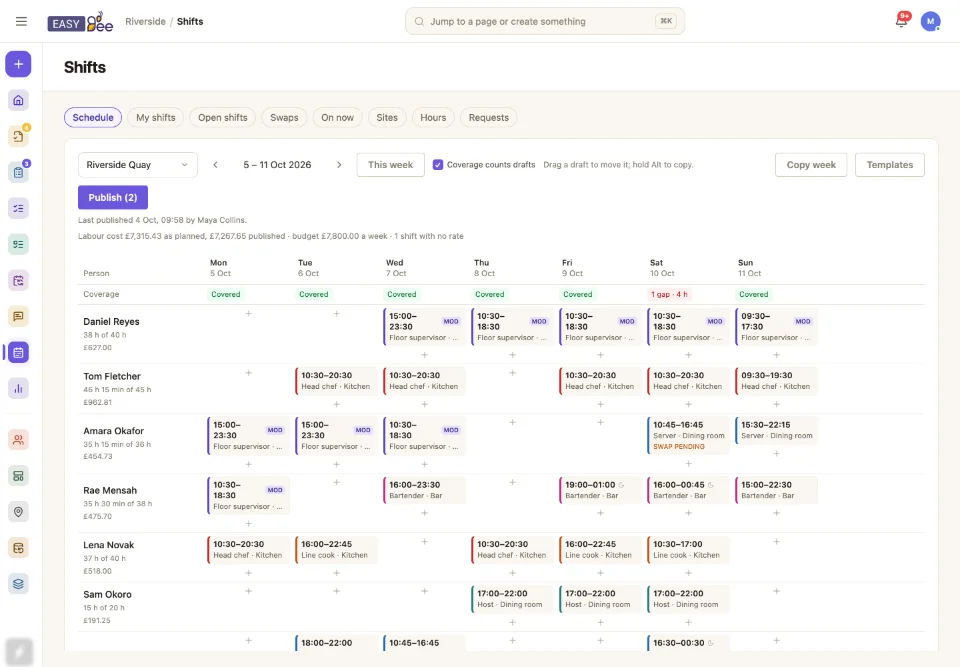
Most rotas live in a spreadsheet, or in a scheduling app that knows nothing about the work. The rota says who is in; the tasks, the checklists and the group chat all live somewhere else, and the join between them is a manager remembering who is on today.
In EasyBee the rota is the same data the work runs on. A task can go to whoever is on shift as Head chef at Riverside Quay, and it reaches the right person whatever the rota says that day. @manager-on-duty in a channel reaches whoever is running the floor right now. On now shows who is working at every site, with the manager on duty first.
See the gaps before the shift does
Tell EasyBee what each site needs: two servers from eleven, a third through the evening peak, a head chef until eight, and at least two people on site whatever their position. The rota is measured against that as you build it, drafts included, so a gap shows up on Tuesday afternoon and not at six on Saturday.
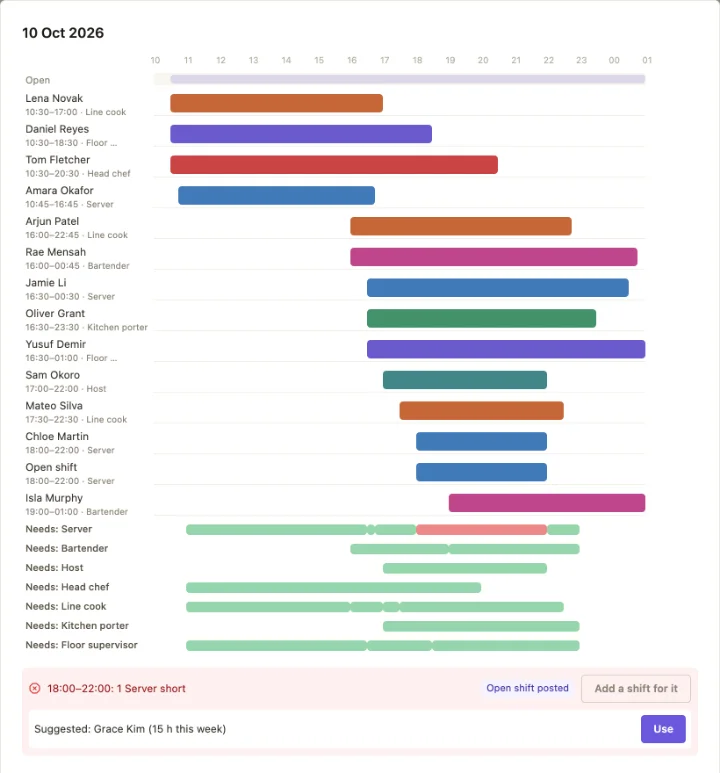
The day view lays every shift on a timeline over what each position needs. A gap comes with three ways to close it: add a shift exactly that long, extend a neighbouring shift where the rules allow, or take the suggested person, which is somebody qualified and available with the fewest hours so far. A short overlap at a handover is not counted as overstaffing, because a handover is not a mistake.
Some cover can't be any pair of hands. A key holder to open up, a first aider whenever the doors are open, a licence for the bar: certifications sit apart from positions, with their expiry dates, and a site can require at least one certified person whenever it is open. The gap names the certification, and the holder and their managers are reminded before it runs out.
Rules that warn, and the few that block
A contract type holds the limits for one kind of contract: the most hours in a day and in a week, the least rest between shifts, days in a row, breaks, night work and when overtime starts. Each limit is set to warn or to block.
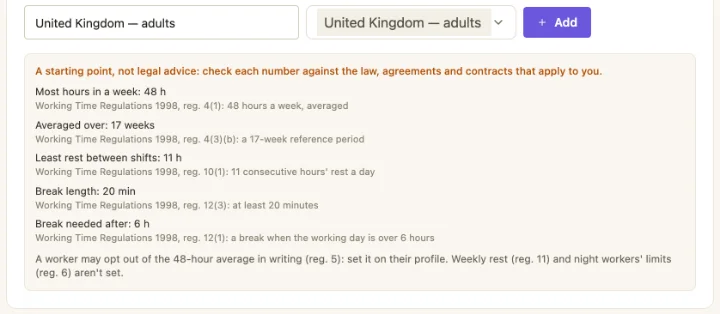
Start one from a country preset, with the United Kingdom (adults and under 18), the EU, Spain, the UAE, Saudi Arabia and US federal overtime, and the numbers arrive with their sources. A week limit can be averaged over several weeks, a person can opt out of it in writing, and a limit calendar changes the limits by period, so a student works fewer hours in term time than in the holidays.
Give someone a date of birth and EasyBee knows when they are under 18: the workspace's young-worker limits apply on top of their own contract, the stricter of each, and every finding says "under 18". The date itself is seen only by them and by whoever manages contracts and hours.
Warn, don't block
Rotations, crews and on call
Not every rota is weekly. A repeating shift can run in a cycle of days, four on and four off, 2-2-3, or a DuPont pattern, and stay in step when its times change. A crew follows one rotation together: someone who joins picks it up from that day, and someone who leaves has their part ended without touching anyone else's.
On-call shifts sit on the rota without counting as worked time. When someone is called out, the call-out is recorded with its times and becomes worked time, paid at least the contract's call-out minimum, beside a flat amount for being on call.
Publish when it is right
Every change is a draft, seen by managers only, until it is published. Editing a published shift makes a draft copy, so staff keep seeing the original until the next publish rather than a rota that moves under them while you work.
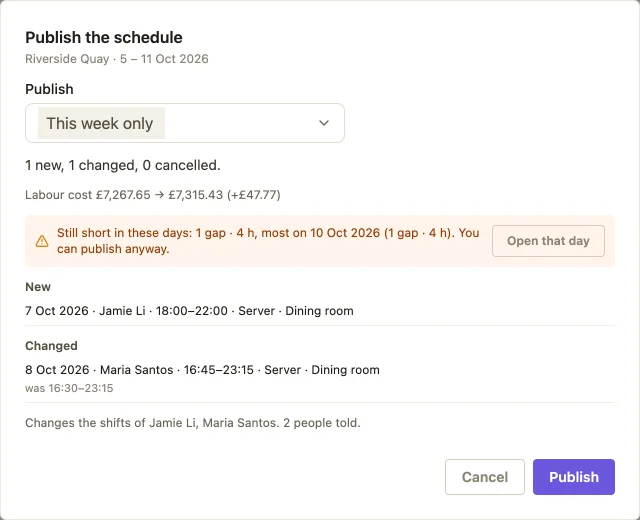
The review before publishing lists every new, changed and cancelled shift, every rule finding, anything that can't be published yet and why, the coverage it leaves, and what it does to the labour cost. Warnings never stop you. Everyone affected is told once, with the change spelled out.
Where a predictable-scheduling law or your own policy asks for notice, set a notice period for the workspace or a site. The review marks every change inside it, publishing records it with the notice given, and the payroll export flags it.
Clock in, and the timesheet writes itself
People clock in and out on their own phone or on the web, from fifteen minutes before their shift. A site can say where it is: a clock from outside its radius is flagged, or refused where the site requires people to be there. Someone who forgets to clock out is clocked out at the end of their shift and flagged, and a manager hears about a shift that started with nobody clocked in.
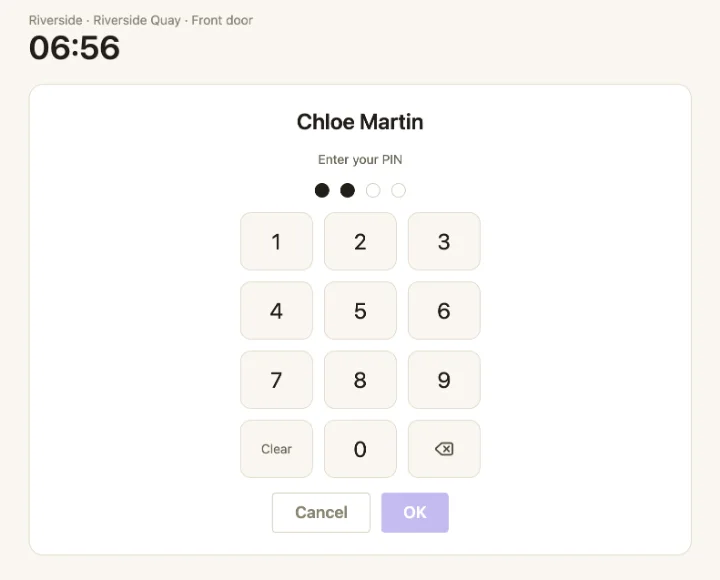
Or put a tablet by the door. A kiosk is paired to a site with a one-time code, lists who is on today, and each person taps their name and enters their own PIN. A site can take a photo with every kiosk clock, kept for as many days as the workspace sets, and choose whether people clock on their own phones, at the kiosk, or either.
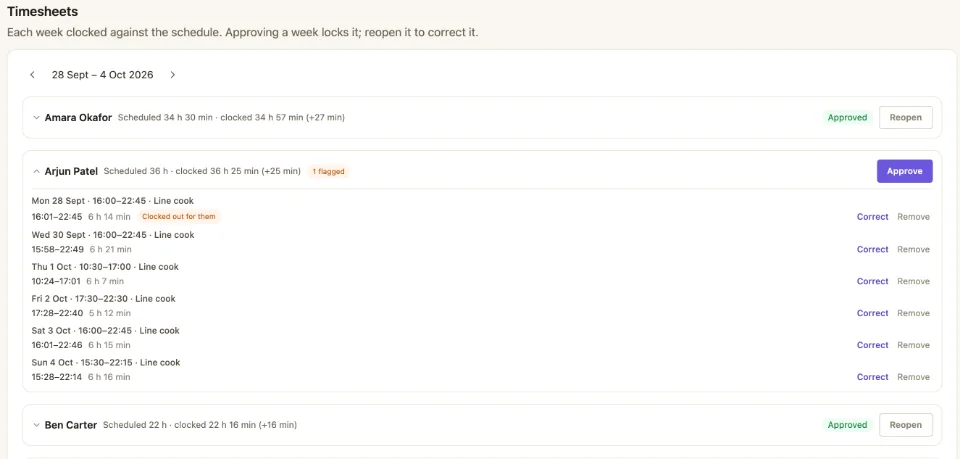
Each person's week becomes a timesheet: clocked hours beside scheduled ones, every flag in words, and the shifts nobody clocked. A manager corrects a record or adds a forgotten one, and approves the week once it is over, which locks it. Late arrivals past a site's grace period and no-shows are counted in an attendance report for each person, and a no-show alerts the manager at once.
For people on flexitime, the timesheet counts their week against the hours expected of them instead of a rota: core hours they should be in, and a running balance, kept within a cap either way.
Leave, with the balance beside it
Leave types start with annual, personal, sick and other, and you add your own: paid or unpaid, taken from the balance or not, needing evidence, or allowing part of a day. A contract type gives an allowance in days or hours, built up each month from a yearly figure in proportion to the person's weekly hours, or as a share of the hours they worked. Above a carry-over cap, what is left expires at the end of the leave year.
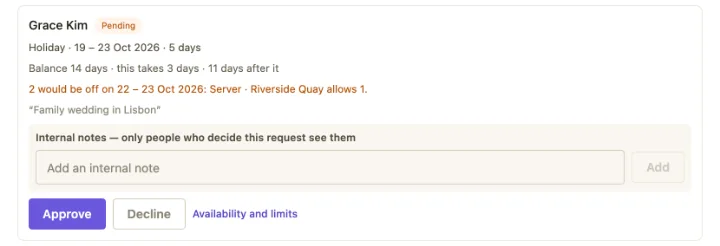
Each request shows the balance it would leave, to the person asking and to whoever decides it. Blackout dates refuse requests on the days you can't spare anyone, and a cap on how many people in a position or at a site can be off at once warns before you approve one too many. A manager can record leave for someone, and the balance is a ledger of every day built up, taken, given back, corrected or expired.
Overtime and worked public holidays can be paid or banked as time off in lieu, per contract type, hour for hour when the timesheet is approved. The banked hours are taken like any other leave.
When someone can't come in, Can't make it on today's or tomorrow's shift records the sick day, posts the shift as open and tells whoever builds the rota at once. Leave that has already started ends early only when a manager approves the return, so the days given back are never a surprise.
Pay rules, labour cost and payroll
Each person has an hourly rate or a yearly salary from a date, so a raise applies from the day it starts and last month keeps its cost. A contract type sets premiums for nights, weekends and public holidays, as a multiplier or an amount an hour, with the highest paid or all of them added up. Overtime can start by the day and by the week, and can be a rule that warns or blocks like any other. Each site has a weekly budget, and the cost of the rota as planned and as published sits above it, with the week flagged when it goes over.
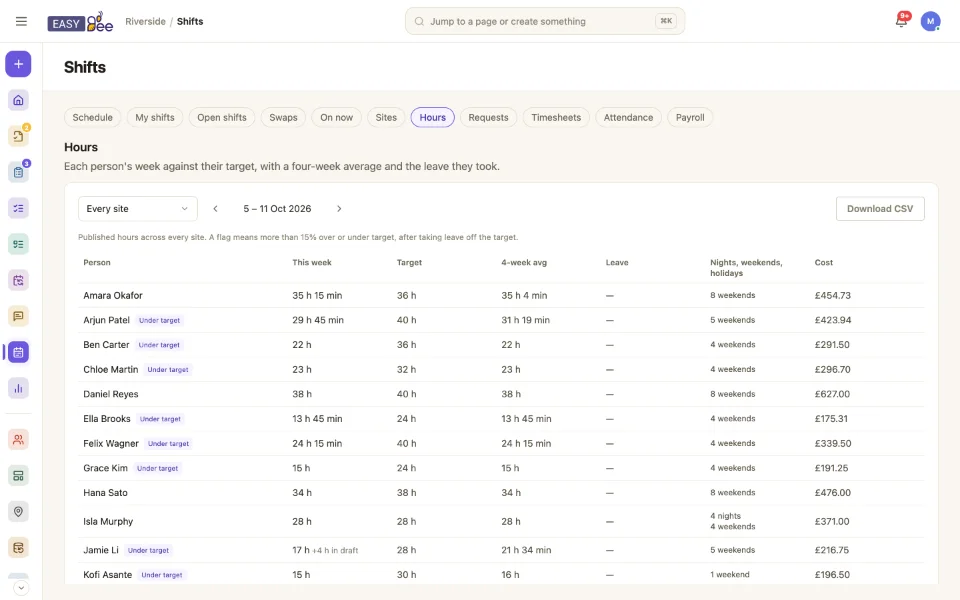
Hours are counted against each person's weekly target, and anyone well over or under is flagged, so fairness is a report rather than an argument. Nights, weekends and holidays are counted too, per person over four weeks, and the suggestions for filling a gap weigh them first. A workspace can let staff see their own estimated pay for the week.
At the end of the period, the payroll export lists each shift as worked, from its clock record or else its published hours, priced exactly as the labour cost prices it. Pick the columns and their headings to match what your payroll provider imports, one row per shift or per person, and download the CSV.
Staff run their own week
Everyone sees their shifts on their phone, with the next one at the top and their hours against target. They can offer a shift to a colleague or to anyone who can take it, claim an open shift, set when they can and can't work, and ask for time off with their balance beside the form, all without a message to a manager's personal number.
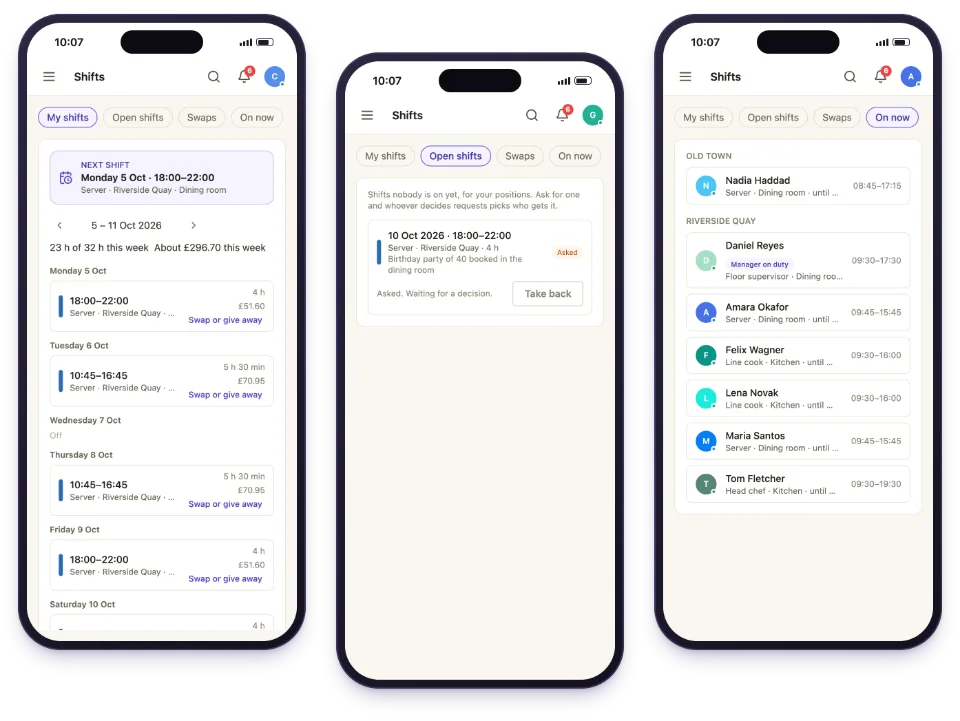
Each request lands with whoever approves at that site, with what it would do to the person's week alongside it. A manager can also open a week's open shifts for bidding: everyone picks what they would like, the shifts are shared out to whoever has the fewest hours without taking anyone past their contracted hours, and the manager confirms. Published shifts can go straight into Google, Apple or Outlook calendars through a private link.
Several sites, one team
Keep one rota for the whole business or one per site. People who work at more than one site see all of it in one place, and each site's rota shows their shifts elsewhere as busy. A manager can borrow someone from another site, and travel time between sites is checked like any other rule. The Sites view puts every site's gaps, hours and publishing side by side, and several sites publish in one go.
Where shifts fit
The rota decides who is working; the rest of EasyBee decides what they do. Recurring schedules put the routine work on the day it is due, assigned to whoever is on shift. Checklists record how it was done, approvals say it was acceptable, and team chat keeps the conversation beside it. Connect Claude, and it can read the rota, find the gaps and propose a fair way to fill them, saving the shifts you accept as drafts for a manager to publish.